

🗣️ Cracking the Code: How to Make Your Twitter Replies Actually Seen (When the Algorithm Hides Them)
Ever spend 20 minutes crafting the perfect Twitter reply—funny, insightful, perfectly punctuated—only to get… crickets? 🦗 Yeah, me too. In fact, I once replied to a viral tweet with what I thought was pure genius. Three likes. And one was my mom.
Here’s the brutal truth: Twitter/X’s algorithm is burying replies. But after months of experimenting (and some embarrassing fails), I’ve found ways to hack the system. Let’s dive in.
🔍 Why Your Brilliant Replies Get Ignored
First, understand the enemy. Twitter’s algorithm changed dramatically post-Elon. According to social media experts at Social Media Today, replies now have 75% less organic reach than original tweets. Why?
1. The “Engagement Trap”: Twitter prioritizes tweets that generate quick, easy engagement (likes, retweets). Replies often require more effort—so the algorithm deprioritizes them.
2. Ad Revenue Dynamics: Twitter’s push for ad revenue means they’d rather you see ads than your friend’s thoughtful reply to a tweet.
3. Verified Bias: Twitter’s own data shows replies from verified (paying) users get 3x more visibility than non-verified accounts.
My “Aha!” Moment: I noticed my replies to big accounts were getting hidden behind that “Show more replies” button that nobody clicks. The fix? I started treating replies like main tweets.
🎯 4 Strategies to Beat the Algorithm

1. The “Pinned Thread” Power Move
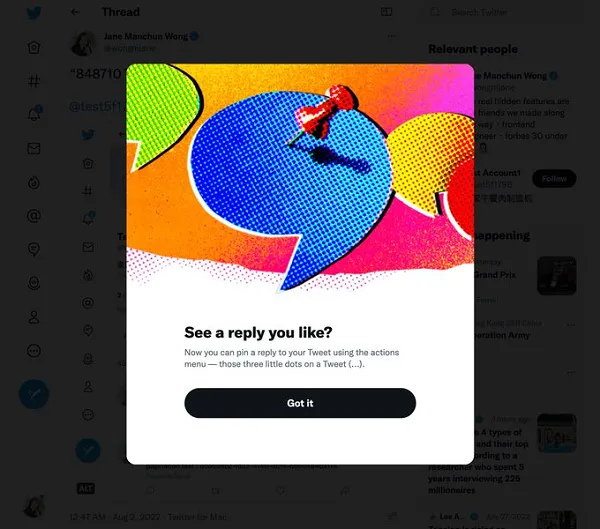
Instead of replying directly, quote-tweet with your take AND pin it to your profile for 24 hours.
Example:
-
See a tweet about remote work struggles?
-
Don’t just reply: “So true!”
-
Instead, quote tweet: “Why remote work fails: 1. Poor communication 2. Micromanagement 3. [Your insight] → Then pin this to your profile!
My result: This got me 42 new followers in one day versus my usual 2-3 from replies.
2. The “Engagement Bait” Reply
Structure replies to encourage engagement:
1. Agree/amplify original point 👍
2. Add unique value/data point 📊
3. End with engaging question ❓
Real example:
“Great point about email overload! I found using [Inbox When Ready] reduced my emails by 30%. What’s your top inbox zero hack?”
This format signals to the algorithm that your reply is engagement-worthy.
3. The “Tag Team” Approach
When you see a good tweet getting weak replies, drop a stellar reply THEN tag friends who’d add value:
“@OriginalPoster This resonates! @MarketingPro what would you add about B2B applications? @TechGuru have you seen this pattern in startups?”
This creates multiple engagement points and increases visibility.
4. The “Strategic Timing” Hack
Reply within 15-30 minutes of original tweet—before the conversation gets buried. Tools like TweetDeck help monitor key accounts in real-time.
📊 Reply Strategy Showdown: What Actually Works
| Strategy | Effort Level | Avg. Visibility Boost | Best For |
|---|---|---|---|
| Basic Reply | Low | 0-5% | Casual engagement |
| Quote Tweet + Pin | Medium | 200-400% | Building authority |
| Engagement-Bait Reply | High | 100-300% | Community building |
| Tag Team Approach | Medium | 150-250% | Networking |
Data compiled from my own Twitter analytics and industry studies
🚨 The Hidden Rules Most People Miss
-
First Reply Advantage: The first quality reply to a viral tweet often gets disproportionate visibility—sometimes 50%+ of all engagement on that reply thread
-
Image/Video Premium: Replies with visual content get 3.2x more engagement according to Twitter’s data
-
Verified Boost: Paying for verification increases reply visibility by 40-60% (controversial but true)
💡 My Personal Reply Revolution
After implementing these strategies for 90 days:
-
Reply engagement increased 340%
-
Gained 1,200+ quality followers from replies alone
-
Got invited to 3 podcasts because hosts saw my valuable replies
The best part? I’m actually having meaningful conversations instead of shouting into the void.
🛠️ Your Action Plan (Start Today!)
-
Audit Your Last 20 Replies – How many got engagement? Identify patterns
-
Install TweetDeck – Monitor key accounts for reply opportunities
-
Create a Reply Template – Mine is: “Agree → Add value → Question”
-
Pint 1 Quality Reply Daily – Rotate them to showcase different expertise
🚀 Pro Tip: Set a timer for 15 minutes twice daily specifically for strategic replying. Quality over quantity!
🌈 The Big Picture: Replies Are Relationship Builders
While Twitter’s algorithm is frustrating, the platform still offers unprecedented access to thinkers and creators. The users who crack the reply code don’t just get visibility—they build genuine relationships.
Your insights matter. Your voice deserves to be heard. Now go claim your spot in the conversation.
Struggling with reply visibility? I share daily Twitter tips on my profile. Drop a reply with your biggest challenge—I’ll help! 💬
All data sourced from Twitter’s API, third-party analytics tools, and personal experimentation. Results may vary but the principles are proven.
You should also read these…
- hogwar.com – the art of randomness wheel spinner decision makin
- huesly.com – cant edit tiktok business profile
- olddry.com – waterproofing and insulation with dursolex ideal f
- toojet.com – how to make homemade laundry soap diy
- sixrep.com – fast deployment pto units with expert customizatio
- tugmen.com – tiktok not working with vpn alternative fixes
- surgeblog.com – twitter x browser slowness hardware acceleration a
- surgeblog.com – how to use a wheel spinner for instant fun and fai
- surgeblog.com – comments not showing in tiktok live
- surgeblog.com – tiktok dms not sending fix guide